Datasets
Typearray
A dataset is a container for data of a homogeneous nature, characterized by standardized data classes, with its volume necessitating storage within the HDF5 structure. Through the process it originates, the dataset establishes a connection between the data and physical reality (time/space).
The datasets array describes datasets properties and how they relate to the acquisition and post-processing processes.
| Property | Type | Technology | Description |
|---|---|---|---|
| id | integer | All | The unique dataset id within the group |
| name | string | All | The name of the dataset |
| storageMode | string | UT | One of Independent or Paintbrush. See the storageMode conventions. |
| dataTransformations | array | All | A dataTransformations array describing the various operations to perform on the dataset |
| path | string | All | The path to the dataset in the HDF5 structure |
| dataClass | string | All | UT One of: AScanAmplitude, AScanStatus, TfmValue, TfmStatus, FiringSource, CScanPeak, CScanStatus, CScanTime ET One of: Impedance, ImpedanceStatus |
dataValue required |
object | All | A dataValue object |
dimensions required |
array | All | A dimensions array. See the supported datasets section for the possible configurations. |
dataTransformations
Typearray
The dataTransformations array references the last process of the processes chain to consider for all transformations that should be applied to the dataset. See the typical groups structure examples.
| Property | Type | Description |
|---|---|---|
processId required |
integer | The processId of the last process in the chain |
| groupId | integer | The groupId of the last process in the chain (not required if in the same group) |
dataValue
Typeobject
The dataValue object describes the range or possible values a dataset can contain.
UT For AScanAmplitude, TfmValue, CScanPeak, and CScanTime data classes
ET For Impedance data class
| Property | Type | Description |
|---|---|---|
min required |
number | Minimum value possible of the dataset |
max required |
number | Maximum value possible of the dataset |
unitMin required |
integer | Minimum value possible of the dataset in the corresponding unit |
unitMax required |
integer | Maximum value possible of the dataset in the corresponding unit |
unit required |
string | UT One of the following: Percent, Coherence, Seconds ET One of the following: Percent |
To map a value from the range [min, max] to [unitMin, unitMax], use the following formula:
Info
ET Eddy current impedance data is stored as a complex number. The HDF5 dataset uses a compound type with an r key for the real component and an i key for the imaginary component. The min, max, unitMin, and unitMax scaling is applied independently to each component.
UT For AScanStatus, TfmStatus, and CScanStatus data classes
| Property | Type | Description |
|---|---|---|
hasData required |
integer | Has data status value |
noSynchro required |
integer | No synchronization status value |
saturated required |
integer | Saturated status value |
unit required |
string | Bitfield |
ET For ImpedanceStatus data class
| Property | Type | Description |
|---|---|---|
hasData required |
integer | Has data status value |
saturated required |
integer | Saturated status value |
unit required |
string | Bitfield |
Note
A bitfield array is a compact way to store multiple flags using only a few bits per item. Each flag is read or written using bitwise operations on the stored integer value.
"dataValue": {
  "hasData": 1, //(1)!
  "saturated": 2, //(2)!
  "noSynchro": 4, //(3)!
  "unit": "Bitfield"
}
- hasData is encoded on the first bit (binary 001 → decimal 1)
- saturated is encoded on the second bit (binary 010 → decimal 2)
- noSynchro is encoded on the third bit (binary 100 → decimal 4)
So hasData + saturated evaluates to:
| Flags | Binary | Decimal |
|---|---|---|
| hasData + saturated | 011 | 3 |
dimensions
Typearray
The dimensions array describes the different dimensions (axes) of the dataset(s).
Important
Dimensions are always given in the same order as the HDF5 dataset dimensions.
UT For UCoordinate, VCoordinate, WCoordinate, Ultrasound, and StackedAScan axes:
| Property | Type | Unit | Description |
|---|---|---|---|
axis required |
string | - | One of the following: UCoordinate, VCoordinate, WCoordinate, Ultrasound,StackedAScan |
| offset | number | m or s | Offset to position the dataset |
quantity required |
integer | - | Size of the dataset against this axis (dimension) |
resolution required |
number | m or s | Resolution of the dataset against this axis (dimension) |
"dimensions": [
  {
    "axis": "UCoordinate",
    "offset": 0.0,
    "quantity": 101,
    "resolution": 0.001
  },
  {
    "axis": "VCoordinate",
    "offset": 0.0,
    "quantity": 57,
    "resolution": 0.001
  },
  {
    "axis": "Ultrasound",
    "offset": -1.01E-06,
    "quantity": 364,
    "resolution": 2E-08
  }
]
UT For the Beam axis:
| Property | Type | Description |
|---|---|---|
axis required |
string | Beam |
beams required |
array | A beams array |
beams
UT Typearray
| Property | Type | Unit | Description |
|---|---|---|---|
| id | integer | - | The unique beam id within the acquisition process |
velocity required |
number | m/s | The velocity used to calculate focal laws |
skewAngle required |
number | ° | The beam skew angle |
refractedAngle required |
number | ° | The beam refracted angle in the specimen |
uCoordinateOffset required |
number | m | The beam exit point offset w.r.t to \(u\) axis |
vCoordinateOffset required |
number | m | The beam exit point offset w.r.t to \(v\) axis |
ultrasoundOffset required |
number | s | The beam offset w.r.t to time (ultrasound) axis |
"dimensions": [
  {
    "axis": "UCoordinate",
    "quantity": 301,
    "resolution": 0.001
  },
  {
    "axis": "Beam",
    "beams": [
      {
        "velocity": 3240.0,
        "skewAngle": 90.0,
        "refractedAngle": 40.0,
        "uCoordinateOffset": 0.0,
        "vCoordinateOffset": -0.03868746281893342,
        "ultrasoundOffset": 0.0
      },
      {
        "velocity": 3240.0,
        "skewAngle": 90.0,
        "refractedAngle": 41.0,
        "uCoordinateOffset": 0.0,
        "vCoordinateOffset": -0.038554784991032057,
        "ultrasoundOffset": 0.0
      },
      {...}]},
  {
    "axis": "Ultrasound",
    "quantity": 1700,
    "resolution": 2E-08
  }
]
Note: The uCoordinateOffset and vCoordinateOffset are only applicable when the surface of the wedge matches the specimen surface on which offsets are referenced.
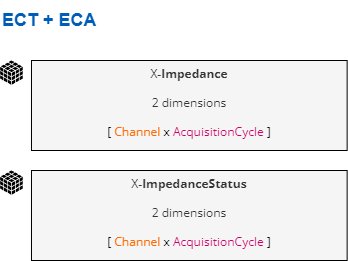
ET For Channel and AcquisitionCycle axes:
| Property | Type | Description |
|---|---|---|
axis required |
string | One of the following: Channel, AcquisitionCycle |
quantity required |
integer | Size of the dataset against this axis (dimension) |
"dimensions": [
  {
    "axis": "Channel",
    "quantity": 16
  },
  {
    "axis": "AcquisitionCycle",
    "quantity": 200
  }
]
These dimensions can vary depending on the group and scan types.
Supported datasets
The datasets shape may vary depending on the type of scanning and data mapping strategy. The following types are defined:
- One Line Scanning: The probe is mechanically moved against a single axis on the surface of the specimen.
- Raster Scanning: The probe is mechanically moved against two axes on the surface of the specimen.
- ET All Cycle: Data is stored cycle by cycle using an allCycle data mapping, without prior spatial indexing. A subsequent mapToDescrete process converts it to a spatially-indexed grid.
Conventional ultrasonic testing (UT)
For conventional ultrasonic testing (UT), two datasets are supported: one containing the raw A-Scans (dataClass = AScanAmplitude), and another containing the status information (dataClass = AScanStatus, see above) for each A-Scan. The dimensions of each dataset can be organized as illustrated below.
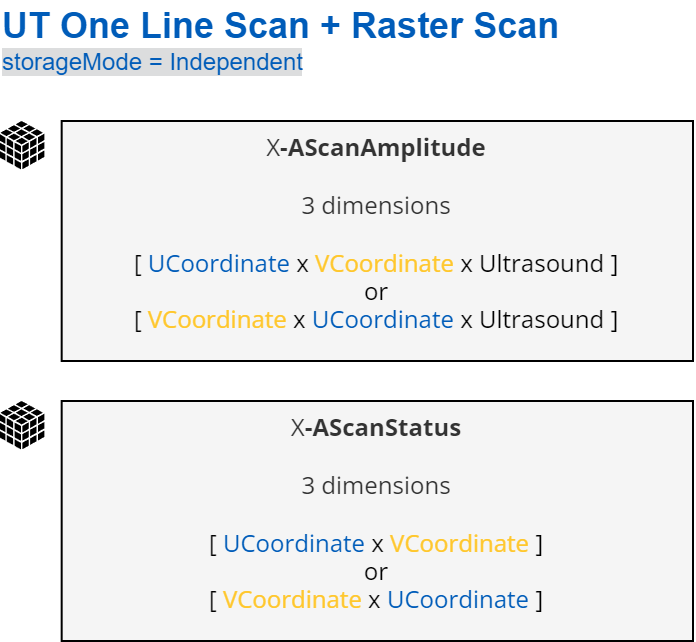
Example files: Manual weld scanning
Phased array ultrasonic testing (PAUT)
For phased array ultrasonic testing (PAUT), two datasets are supported: one containing the raw A-Scans (dataClass = AScanAmplitude), and another containing the status information (dataClass = AScanStatus, see above) for each A-Scan. The dimensions of each dataset can be organized as illustrated below. Three cases are presented, depending on the type of scanning and storage mode.
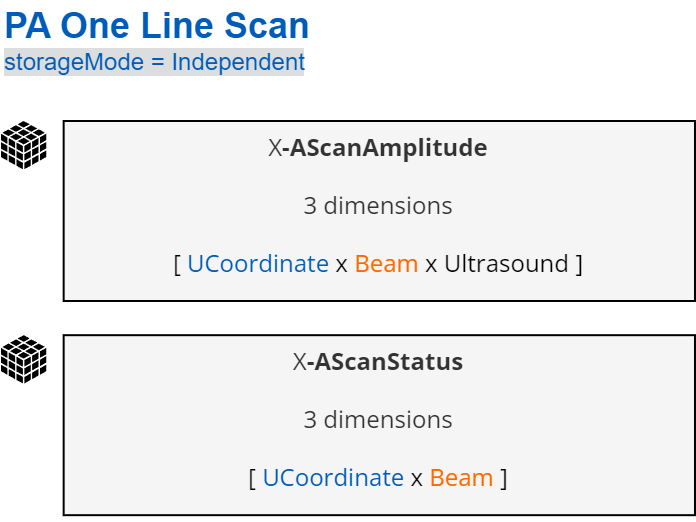
Example files: Manual weld scanning, Semiautomated weld scanning
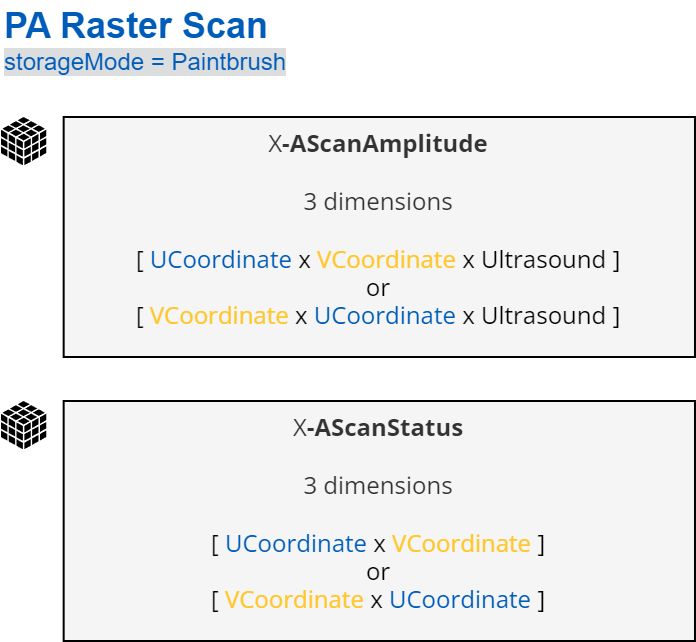
Note that an additional dataset with dataClass = FiringSource is also used in this configuration but not documented to date.
Example files: Composite wheel probe scanning, Corrosion inspection, Pipe elbow corrosion
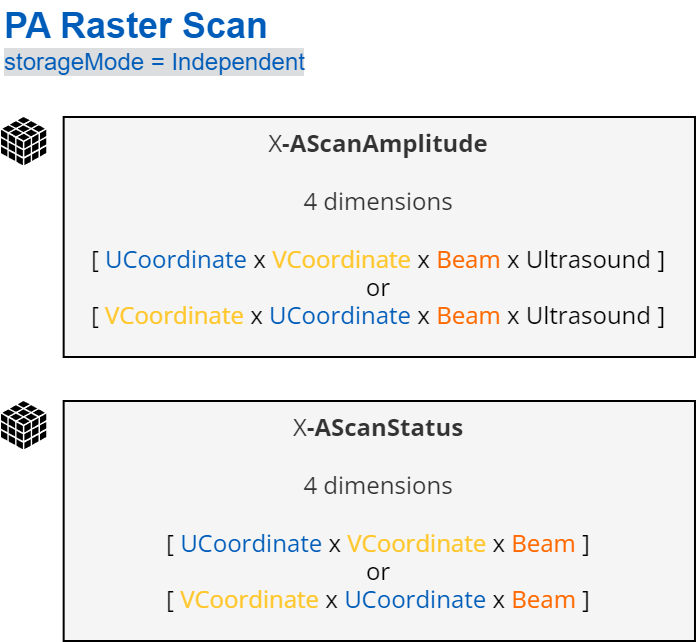
Example files: Composite wheel probe scanning
Total focusing method and its derivatives (TFM/PCI/PWI)
For total focusing method and its derivatives (TFM/PCI/PWI), two datasets are supported: one containing the reconstructed images (dataClass = TfmValue), and another containing the status information (dataClass = TfmStatus, see above) for each image. The dimensions of each dataset can be organized as illustrated below.
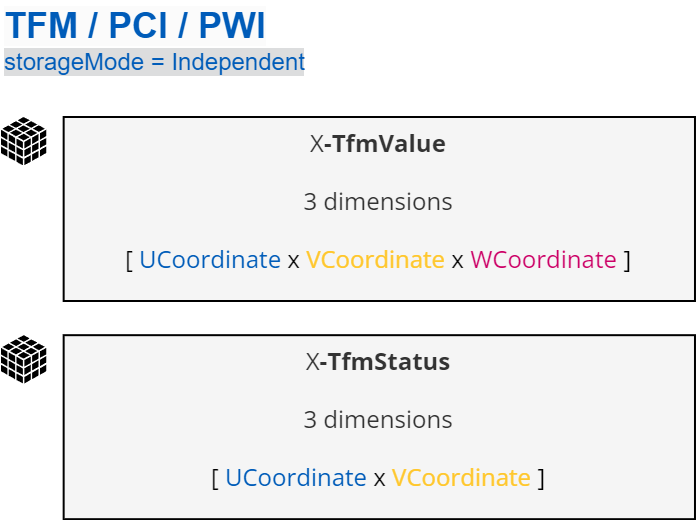
Example files: Manual weld scanning, Girth weld scanning, Composite X-Y scanning
Full Matrix Capture (FMC)
For Full Matrix Capture (FMC), one dataset type is supported which contains the elementary A-Scans (dataClass = AScanAmplitude). The dimensions of the dataset can be organized as illustrated below.
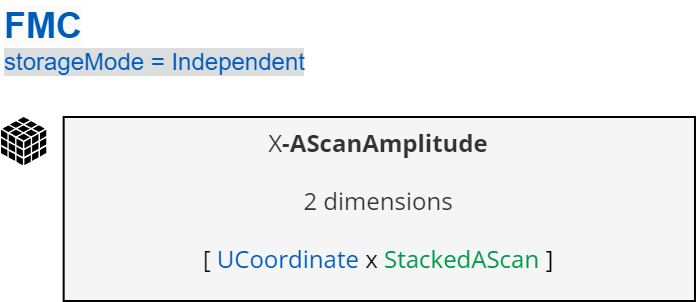
The stackedAScan dimension is organized as illustrated below:
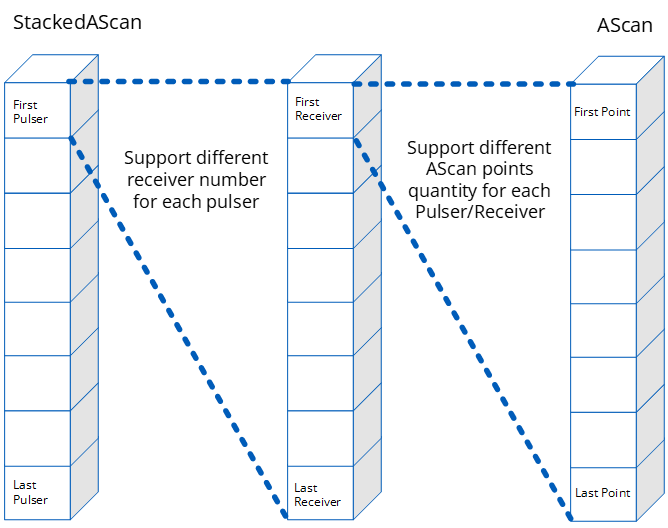
Example file: Full matrix capture
Conventional Eddy Current Testing (ECT) and Eddy Current Array (ECA)
For Eddy Current Testing (ECT) and Eddy Current Array (ECA), the supported dataset type contains the raw impedance strip charts (dataClass = Impedance). The dimensions of the dataset can be organized as illustrated below.